

Shubham Maurya
4 min read · Mon Sep 18 2023
Elevate Your Development Workflow with TypeScript
Recently I have been working on a short project trying out Next.js And I have setup the project with TypeScript. Here's a gist of what the project is - Users can create, share forms, and get responses on the form.
I have a page for creating forms which is wrapped in a React Context that stores the state of the form.
This is the interface of the state of a form. The form consists of a unique id, title, description and an array of questions.
interface CreateFormState {
    id: string;
    title: string;
    description: string;
    questions: Question[];
}
Question is defined as a type consisting of fields - id, title and answerType.
type Question = {
    id: string;
    title?: string;
    answerType: AnswerType;
};
The type of Question is a bit more complex than this as I also have to keep track of the state of answers
for example the options of the checkbox/radio the user inputs
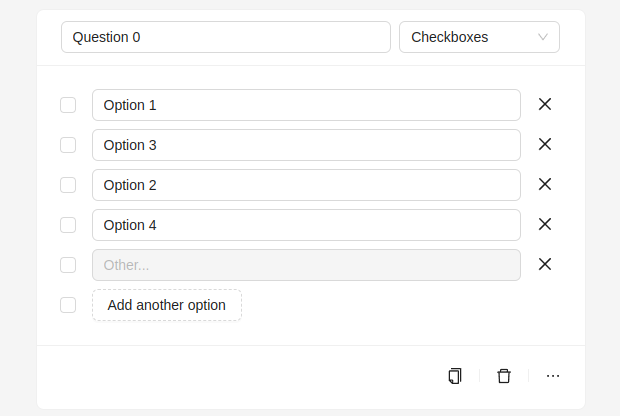
AnswerType is type that defines what type of response the question can accept. Depending on the selected answerType a different input component is rendered.
A normal input for short-answer, a list of checkboxes for checkbox-answer, and so on.
type AnswerType
    = 'short-answer'
    | 'long-answer'
    | 'radio-answer'
    | 'checkbox-answer';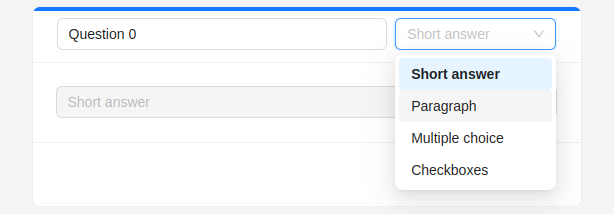
The data is stored using the useReducer hook from React.
const [formData, dispatchFormData] = useReducer(formDataReducer, initialFormState);Here is the reducer function which specifies how the state gets updated.
function formDataReducer(state: CreateFormState, action: CreateFormAction): CreateFormState {
    const { type, payload } = action;
    switch (type) {
        case CreateFormActionKind.UPDATE_TITLE:
            return {
                ...state,
                title: payload
            };
        case CreateFormActionKind.UPDATE_DESCRIPTION:
            return {
                ...state,
                description: payload
            };
        default:
            return state;
    }
}
[Note]: Not all actions are present in this code snippet.
This is where the TypeScript's type-checking is really helpful. As I can define the type of actions the reducer function can accept and the type of payload that needs be sent when calling the function.
Here are the type of actions that can be performed on the create form state. This is defined as a TypeScript Enum.
These actions define updating the title and description of the form respectively.
enum CreateFormActionKind {
    UPDATE_TITLE = 'UPDATE_TITLE',
    UPDATE_DESCRIPTION = 'UPDATE_DESCRIPTION'
}
Here is the action defining the type of the payload as string when we are updating the title or the description of the question.
type CreateFormAction = {
    type: CreateFormActionKind;
    payload: string;
};
Let's add another action for adding a new question to the questions array of the create form state. For that we need to add a new entry in the CreateFormActionKind enum.
enum CreateFormActionKind {
    UPDATE_TITLE = 'UPDATE_TITLE',
    UPDATE_DESCRIPTION = 'UPDATE_DESCRIPTION',
    ADD_QUESTION = 'ADD_QUESTION'
}
And now let's handle this action in the reducer function.
function formDataReducer(
  state: CreateFormState,
  action: CreateFormAction
): CreateFormState {
  const { type, payload } = action;
  switch (type) {
    ...
    case CreateFormActionKind.ADD_QUESTION:
      return {
        ...state,
        questions: [...state.questions, payload],
      };
    ...
  }
}
But adding this action in the function causes error. Since the type of payload is defined as string in the CreateFormAction and we are trying to push that to the questions array which is of type Question.

To fix this we will have to modify the CreateFormAction a bit.
type CreateFormAction =
    | {
            type: CreateFormActionKind.UPDATE_TITLE | CreateFormActionKind.UPDATE_DESCRIPTION;
            payload: string;
      }
    | {
            type: CreateFormActionKind.ADD_QUESTION;
            payload: Question;
      };
We defined CreateFormAction as Union of types so if -
- ActionKind is UPDATE_TITLE or UPDATE_DESCRIPTION then the type of payload should be **string**.
- ActionKind is ADD_QUESTION then the type of payload should be **Question** and we will have to pass a Question object to the function.
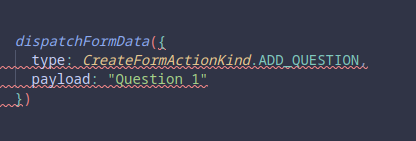
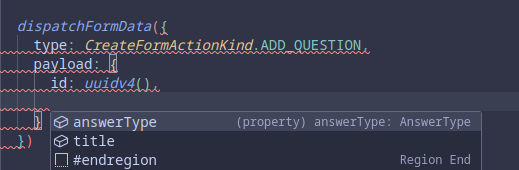
And now we should be able to use this action for adding new questions. If we try to call this dispatch function in another component we will know the actions that can be performed on the state, the associated type of payload that the action accepts and we also get the Intellisense and auto-completion if we use an IDE with LSP.
Using this we can add more actions for:
- Updating the title of the question
- Deleting a question from array
- Sorting the questions
- Changing the type of the answer for a question.
- and more...
This may feel like typing extra for defining types, but it helps in narrowing the weird things that may happen during the runtime. Because JavaScript is just a weird language.
So yeah that's how TypeScript makes development easier and accelerates developer productivity.